

Designing the blog card and post hero
Reading time, cover assets, and the shared contract from card to hero
- Published
- 16 April 2026
- Read time
- 13 min read
Was this useful?
The blog listing is the front door to most posts — it’s what someone sees when they
land on /blog, and it should communicate enough about each post that they can
decide whether to click. Getting the card right matters.
There are also some practical decisions baked into the implementation that are worth documenting: where reading time is calculated, how cover and thumbnail assets move through the site, how the card stays visually consistent in a grid, and how the same content contract scales from the listing card to the full post hero. Draft handling exists too, but mostly as a development convenience rather than a core product feature.
Scope note: this article stays focused on the contract between two UI surfaces: the blog card and the page hero. A few supporting features appear along the way, and they will be covered in later articles in the series: reading time, tag architecture, Pagefind thumbnails and search metadata, breadcrumb markup, the share widget, and the draft-to-publish flow.
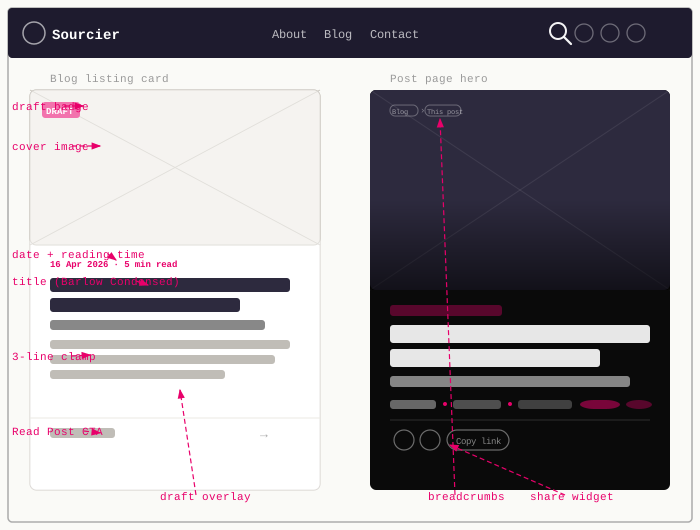
The card component
BlogPost.astro is a pure presentational component, and its contract includes
readingTime as well as the original card data. The listing pages compute
reading time upstream and pass it in so the card itself stays presentational:
---const { description, title, subTitle, url, cover, pubDate, draft, readingTime,} = Astro.props;const formattedDate = pubDate ? new Date(pubDate).toLocaleDateString("en-GB", { year: "numeric", month: "short", day: "numeric", timeZone: "Europe/London", timeZoneName: "short", }) : null;---
<a href={url} class={`card card__blog${draft ? " card__blog--draft" : ""}`}> {draft && ( <span class="card__draft-badge" aria-label="Draft">Draft</span> )} {cover && ( <div class="card__cover"> <img src={cover.image.src} alt={cover.image.alt} /> <div class="card__cover-overlay" aria-hidden="true" /> </div> )} <div class="card__body"> {formattedDate && ( <p class="card-meta"> {formattedDate} {readingTime && ` · ${readingTime}`} </p> )} <p class="card__title">{title}</p> {subTitle && <p class="card__subtitle">{subTitle}</p>} <p class="card__description">{description}</p> </div> <div class="card__cta"> <span>Read Post</span> <span aria-hidden="true">→</span> </div></a>The entire card is a single <a> — the click target is the full card surface, not
just a button inside it. That keeps the interaction model simple, but it also means
the card should not grow secondary interactive controls inside it. If the design
ever needs a bookmark button, menu, or other separate action, the structure should
change rather than nesting another interactive element inside the link.
The card__cta at the bottom (“Read Post →”) is decorative — it’s not needed for
accessibility because the outer <a> carries the destination, but it’s a clear
visual affordance that the card is clickable.
Reading time is deliberately calculated outside the component. BlogGrid.astro
and the homepage grid both call readingTime(post.body ?? "").text and pass the
result down. That keeps the card focused on rendering, not content parsing.
That split is deliberate: date formatting stays in the component because it is display logic, but reading time is derived from body content and belongs upstream.
Reading time is one of the places where this article deliberately stops short. The important part here is the handoff into the card and hero. The word-count calculation itself, and the decisions behind the exact string formatting, belong in a separate article about reading time as a site-wide concern.
Keeping the grid balanced
Cards in a listing need to feel like they belong to the same system even when the content varies. Some posts have longer subtitles, some have longer descriptions, and some have cover images with very different compositions.
The card layout handles that by fixing the cover area, using a vertical flex layout for the body, and clamping the description so one verbose post does not stretch an entire row.
The description clamp is doing most of the balancing work:
.card__description { overflow: hidden; text-overflow: ellipsis; white-space: initial; display: -webkit-box; -webkit-line-clamp: 3; -webkit-box-orient: vertical;}That keeps the card heights from drifting too far apart while still letting the description feel like real copy rather than a one-line stub.
The hover treatment then adds feedback without changing the structure. The card lifts, the cover image scales slightly, and the overlay fades in:
.card.card__blog { transition: transform 0.18s ease, box-shadow 0.18s ease, border-color 0.18s ease;
&:hover { transform: translateY(-4px); box-shadow: 0 10px 32px rgba(232, 0, 106, 0.18); border-color: var(--color-pink);
.card__cover img { transform: scale(1.04); }
.card__cover-overlay { opacity: 1; } }}Those details matter because the listing is dense. Small motion and consistent heights help it read as a curated grid rather than a stack of unrelated links.
Passing the same contract into the hero
The post page uses the same content fields as the card, but with different emphasis. The route computes the reading time and passes it into the layout:
import { getCollection, render } from "astro:content";import { isPublished } from "../../utils/drafts";import readingTime from "reading-time";
const { post } = Astro.props;const { Content, headings } = await render(post);const postReadingTime = readingTime(post.body ?? "").text;---MarkdownPostLayout.astro then forwards the same core metadata into
PageHero.astro as coverImage, so the card and the hero stay visually aligned.
<PageHero title={frontmatter.title} subtitle={frontmatter.subTitle} coverImage={frontmatter.cover?.image && { src: frontmatter.cover.image.src, alt: frontmatter.cover.alt, }} tags={frontmatter.tags} author={frontmatter.author} date={formattedDate} readingTime={readingTime} crumbs={crumbs} shareUrl={shareUrl} shareTitle={frontmatter.title}/>That shared contract is the important architectural decision. The card and the hero are not two unrelated components that happen to show some of the same data. They are two views over the same content model.
The hero component
Every post page uses PageHero.astro as its header. For blog posts, the
interesting part is not just that it can show a cover image, but that it can do
that while still handling breadcrumbs, metadata, tags, and sharing without
turning into a one-off page template.
The prop interface shows the scope clearly:
interface Props { kicker?: string; title: string; subtitle?: string; coverImage?: { src: string; alt?: string }; tags?: string[]; author?: string; date?: string; readingTime?: string; crumbs?: Crumb[]; shareUrl?: string; shareTitle?: string;}That gives the hero enough information to work for post pages, listing pages, and any future landing page that wants the same visual treatment.
If crumbs is omitted, PageHero.astro can derive breadcrumbs from the URL. Post
pages pass them explicitly, but the fallback keeps the component self-sufficient
in other contexts.
The cover image is optional. If it exists, the hero switches into a heavier, image-led mode with a dark gradient overlay. If not, it still renders as a clean text-first hero on a dark background.
Subtle movement and shared share UI
The hero background gets a small parallax effect when a cover image is present. This is the entire script:
const hero = document.querySelector<HTMLElement>( ".page-hero[data-has-cover='true']",);if (hero) { const update = () => { const offset = window.scrollY; hero.style.backgroundPositionY = `calc(50% + ${offset * 0.4}px)`; }; window.addEventListener("scroll", update, { passive: true }); update();}It’s enough to stop the hero feeling static, without turning it into a showy effect that competes with the title.
The share widget is not a separate hero-only implementation. PageHero.astro
renders the shared SharePost component, then restyles it in place so it fits
the darker surface:
.page-hero__share { :global(.share-post__btn) { color: rgba(255, 255, 255, 0.55); border-color: rgba(255, 255, 255, 0.18); background-color: rgba(255, 255, 255, 0.06);
&:hover { color: var(--color-pink); border-color: rgba(232, 0, 106, 0.5); background-color: rgba(232, 0, 106, 0.12); } }}The kicker prop is part of the component API, but MarkdownPostLayout.astro
does not pass it for article pages. It is used in other contexts such as the
blog index hero, which is a good example of why keeping the component contract
slightly broader than any single caller is useful.
The result is a consistent pair of surfaces: the card does the work of getting a reader to click, and the hero takes the same ingredients and gives them enough weight to anchor the full article.
Draft badge and overlay for local development
This is the one part of the card system that exists mainly for the author rather than the reader.
When a post has draft: true, two things happen visually. A pink badge appears
in the top-left corner of the card:
.card__draft-badge { position: absolute; top: 0.625rem; left: 0.625rem; z-index: 2; padding: 0.2rem 0.55rem; background-color: var(--color-pink); color: #ffffff; font-family: "Barlow Condensed", sans-serif; font-size: 0.65rem; font-weight: 700; text-transform: uppercase; letter-spacing: 0.1em;}And a semi-transparent overlay covers the entire card:
.card__blog--draft::after { content: ""; position: absolute; inset: 0; background-color: var(--color-paper); opacity: 0.55; pointer-events: none; z-index: 1;}The overlay is a ::after pseudo-element so it doesn’t add DOM noise. pointer-events: none
ensures it doesn’t intercept clicks — the underlying <a> remains clickable.
The z-index: 1 keeps it below the badge (z-index: 2) so the badge label
stays readable.
This is really a convenience feature for local development, not a production content pattern. Draft posts are filtered out by the publishing logic unless drafts are explicitly enabled, so the badge and overlay mainly exist to make draft-heavy local sessions easier to scan at a glance.
That broader publishing logic is out of scope for this article. The draft
flag itself comes from the content model, and the rules that decide whether a
post is visible belong to the publishing workflow rather than the card design.
Full component listings
If you want to inspect the finished components end to end, expand the listings
below. They show the complete BlogPost.astro and PageHero.astro
implementations in one place while you read.
---const { description, title, subTitle, url, cover, pubDate, draft, readingTime,} = Astro.props;const formattedDate = pubDate ? new Date(pubDate).toLocaleDateString("en-GB", { year: "numeric", month: "short", day: "numeric", timeZone: "Europe/London", timeZoneName: "short", }) : null;---
<a href={url} class={`card card__blog${draft ? " card__blog--draft" : ""}`}> { draft && ( <span class="card__draft-badge" aria-label="Draft"> Draft </span> ) } { cover && ( <div class="card__cover"> <img src={cover.image.src} alt={cover.image.alt} /> <div class="card__cover-overlay" aria-hidden="true" /> </div> ) } <div class="card__body"> { formattedDate && ( <p class="card-meta"> {formattedDate} {readingTime && ` · ${readingTime}`} </p> ) } <p class="card__title">{title}</p> {subTitle && <p class="card__subtitle">{subTitle}</p>} <p class="card__description">{description}</p> </div> <div class="card__cta"> <span>Read Post</span> <span aria-hidden="true">→</span> </div></a>
<style lang="scss"> .card__description { overflow: hidden; text-overflow: ellipsis; white-space: initial; display: -webkit-box; -webkit-line-clamp: 3; -webkit-box-orient: vertical; }
.card__draft-badge { position: absolute; top: 0.625rem; left: 0.625rem; z-index: 2; padding: 0.2rem 0.55rem; background-color: var(--color-pink); color: #ffffff; font-family: "Barlow Condensed", sans-serif; font-size: 0.65rem; font-weight: 700; text-transform: uppercase; letter-spacing: 0.1em; line-height: 1; }
.card__blog--draft { position: relative;
&::after { content: ""; position: absolute; inset: 0; background-color: var(--color-paper); opacity: 0.55; pointer-events: none; z-index: 1; } }</style>PageHero.astro imports Breadcrumb.astro and SharePost.astro, so this
listing keeps those supporting components as imports instead of inlining them.
---import { tagSlug } from "../utils/tags";import Breadcrumb from "./Breadcrumb.astro";import SharePost from "./SharePost.astro";
interface Crumb { label: string; href?: string;}
interface Props { kicker?: string; title: string; subtitle?: string; coverImage?: { src: string; alt?: string }; tags?: string[]; author?: string; date?: string; readingTime?: string; crumbs?: Crumb[]; shareUrl?: string; shareTitle?: string;}
const { kicker, title, subtitle, coverImage, tags, author, date, readingTime, crumbs, shareUrl, shareTitle,} = Astro.props;
function autoCrumbs(path: string): Crumb[] { const segments = path.split("/").filter(Boolean); const meaningful = segments.filter((s) => s !== "page" && !/^\d+$/.test(s)); return meaningful.map((seg, i) => ({ label: seg.replace(/-/g, " ").replace(/\b\w/g, (c) => c.toUpperCase()), href: "/" + meaningful.slice(0, i + 1).join("/"), }));}
const resolvedCrumbs: Crumb[] = crumbs ?? autoCrumbs(Astro.url.pathname);---
<header class="page-hero" style={coverImage ? `--cover-image: url('${coverImage.src}')` : ""} data-has-cover={coverImage ? "true" : "false"}> <div class="container"> <div class="page-hero__inner"> { resolvedCrumbs.length > 0 && ( <Breadcrumb crumbs={resolvedCrumbs} inverted /> ) } {kicker && <p class="hero-kicker">{kicker}</p>} <h1 class="page-hero__title">{title}</h1> {subtitle && <p class="page-hero__subtitle">{subtitle}</p>} { (author || date || readingTime || (tags && tags.length > 0)) && ( <div class="page-hero__meta"> {author && <span class="page-hero__author">By {author}</span>} {date && <span class="page-hero__date">{date}</span>} {readingTime && ( <span class="page-hero__reading-time">{readingTime}</span> )} {(date || readingTime) && tags && tags.length > 0 && ( <span class="page-hero__divider" aria-hidden="true" /> )} {tags && tags.length > 0 && ( <div class="page-hero__tags"> {tags.map((tag: string) => ( <a href={`/tags/${tagSlug(tag)}`} class="page-hero__tag"> {tag} </a> ))} </div> )} </div> ) } { shareUrl && shareTitle && ( <div class="page-hero__share"> <SharePost url={shareUrl} title={shareTitle} /> </div> ) } </div> </div></header>
<script> const hero = document.querySelector<HTMLElement>( ".page-hero[data-has-cover='true']", ); if (hero) { const update = () => { const offset = window.scrollY; // Move the background at 40% of scroll speed for a subtle parallax hero.style.backgroundPositionY = `calc(50% + ${offset * 0.4}px)`; }; window.addEventListener("scroll", update, { passive: true }); update(); }</script>
<style lang="scss"> .page-hero { min-height: 320px; display: flex; align-items: flex-end; padding: 5rem 1.5rem 4rem; background: radial-gradient( ellipse 80% 60% at 70% 0%, rgba(232, 0, 106, 0.18) 0%, transparent 65% ), #0a0a0a; color: #ffffff; position: relative; isolation: isolate; overflow: hidden;
&::before { content: ""; position: absolute; inset: 0; z-index: -1; background-image: radial-gradient( circle, rgba(255, 255, 255, 0.18) 1px, transparent 1px ); background-size: 28px 28px; mask-image: radial-gradient( ellipse 90% 90% at 50% 50%, black 30%, transparent 90% ); -webkit-mask-image: radial-gradient( ellipse 90% 90% at 50% 50%, black 30%, transparent 90% ); pointer-events: none;
@media (prefers-reduced-motion: no-preference) { animation: dot-grid-breathe 4s ease-in-out infinite; } }
@keyframes dot-grid-breathe { 0%, 100% { opacity: 0.5; } 50% { opacity: 1; } }
&[data-has-cover="true"] { min-height: 420px; padding: 5rem 1.5rem 4rem; background-image: var(--cover-image); background-size: cover; background-position: center;
&::after { content: ""; position: absolute; inset: 0; z-index: -2; background: linear-gradient( to bottom, rgba(0, 0, 0, 0.35) 0%, rgba(0, 0, 0, 0.7) 55%, rgba(0, 0, 0, 0.92) 100% ); pointer-events: none; }
.page-hero__tag { background-color: rgba(255, 255, 255, 0.1); border-color: rgba(255, 255, 255, 0.25); color: rgba(255, 255, 255, 0.7);
&:hover { background-color: rgba(232, 0, 106, 0.12); border-color: rgba(232, 0, 106, 0.5); color: var(--color-pink); } } }
.container { position: relative; z-index: 1; width: 100%; } }
.page-hero__inner { max-width: 780px; }
.page-hero__title { font-size: clamp(2.25rem, 6vw, 4rem); font-weight: 800; line-height: 1.05; letter-spacing: -0.02em; margin-bottom: 1rem; color: #ffffff; }
.page-hero__subtitle { font-size: 1.25rem; line-height: 1.5; color: rgba(255, 255, 255, 0.65); margin-bottom: 1.5rem; font-weight: 300; }
.page-hero__meta { display: flex; flex-wrap: wrap; align-items: center; gap: 0.75rem 1rem; font-size: 0.875rem; font-family: "Barlow Condensed", sans-serif; text-transform: uppercase; letter-spacing: 0.08em; color: rgba(255, 255, 255, 0.5); }
.page-hero__author { color: rgba(255, 255, 255, 0.85); }
.page-hero__date { &::before { content: "·"; margin-right: 1rem; color: var(--color-pink); } }
.page-hero__divider { &::before { content: "·"; color: var(--color-pink); }
@media (max-width: 639px) { display: none; } }
.page-hero__tags { display: flex; flex-wrap: wrap; gap: 0.5rem; }
.page-hero__tag { display: inline-block; font-family: "Barlow Condensed", sans-serif; font-size: 0.75rem; font-weight: 600; text-transform: uppercase; letter-spacing: 0.1em; color: rgba(255, 255, 255, 0.55); border: 1px solid rgba(255, 255, 255, 0.18); border-radius: 4px; padding: 0.25rem 0.6rem;
@media (max-width: 639px) { font-size: 0.8rem; padding: 0.4rem 0.75rem; } transition: background-color 0.15s ease, color 0.15s ease, border-color 0.15s ease;
&:hover { background-color: rgba(232, 0, 106, 0.12); border-color: rgba(232, 0, 106, 0.5); color: var(--color-pink); } }
.hero-kicker { display: inline-block; font-size: 0.8125rem; font-weight: 700; text-transform: uppercase; letter-spacing: 0.12em; color: var(--color-pink); margin-bottom: 0.75rem; }
.page-hero__share { margin-top: 1.5rem;
:global(.share-post) { border-color: rgba(255, 255, 255, 0.15); border-bottom: none; padding: 1.25rem 0 0; margin: 0; }
:global(.share-post__label) { color: rgba(255, 255, 255, 0.4); }
:global(.share-post__btn) { color: rgba(255, 255, 255, 0.55); border-color: rgba(255, 255, 255, 0.18); background-color: rgba(255, 255, 255, 0.06);
&:hover { color: var(--color-pink); border-color: rgba(232, 0, 106, 0.5); background-color: rgba(232, 0, 106, 0.12); } } }</style>You can browse the rest of the site code in the sourcier.uk repository.
Working on something similar?
Need help raising the bar?
I help teams improve engineering practice through hands-on delivery, pragmatic reviews, and mentoring. If you want a second pair of eyes or practical support, let's talk.
- Engineering practice review
- Hands-on delivery
- Team mentoring
If this has been useful, you can back the writing with a one-off tip through a secure Stripe checkout.
Free · Practical · One email per post
Get practical engineering notes
One short email when a new article goes live. Useful if you are breaking into tech, growing as an engineer, or improving engineering practice on your team.
Comments
Loading comments…
Leave a comment