

Breadcrumb navigation with Schema.org markup
Auto-generated crumbs, BreadcrumbList structured data, and accessible aria markup
- Published
- 1 May 2026
- Read time
- 5 min read
Was this useful?
Breadcrumbs are one of those components that look simple but have several layers of correctness: the visual trail, the accessible markup, and the structured data for search engines. All three matter and only one of them is visible to users.
Breadcrumb.astro handles all three, and it does so with a fallback auto-generation
system that derives the crumb list from the URL path when no explicit list is provided.
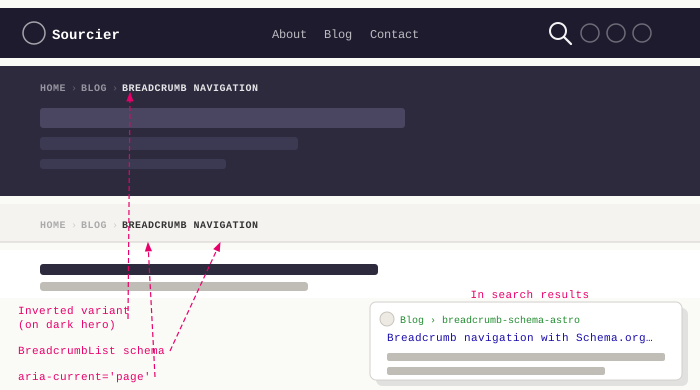
The component interface
interface Crumb { label: string; href?: string;}
interface Props { crumbs: Crumb[]; inverted?: boolean; noContainer?: boolean;}crumbs is an array of label/href pairs. The final crumb in the list should have
no href — it represents the current page and shouldn’t be a link. The inverted
prop flips the colour scheme for placement on dark backgrounds (like the post hero).
The noContainer prop skips the .container wrapper, used when the breadcrumb
sits inside a layout that already handles max-width constraints.
The component prepends a “Home” crumb automatically so callers don’t have to include it in every usage:
const allCrumbs = [{ label: "Home", href: "/" }, ...crumbs];Auto-generation from URL path
In PageHero.astro, if no explicit crumbs prop is passed, the component falls
back to deriving them from the URL:
function autoCrumbs(path: string): Crumb[] { const segments = path.split("/").filter(Boolean); const meaningful = segments.filter( (s) => s !== "page" && !/^\d+$/.test(s) ); return meaningful.map((seg, i) => ({ label: seg.replace(/-/g, " ").replace(/\b\w/g, (c) => c.toUpperCase()), href: "/" + meaningful.slice(0, i + 1).join("/"), }));}The filter strips the literal "page" segment and any purely numeric segments —
so /blog/page/2 produces crumbs for “Blog” but not “Page” or “2”. This is the
right behaviour: pagination is a structural detail, not a meaningful content level.
Labels are formatted by replacing hyphens with spaces and capitalising each word.
"why-astro" becomes "Why Astro". It’s not perfect for every slug — a post
titled “Using MDX” with slug using-mdx would render as “Using Mdx” — but it’s
good enough for this site’s naming conventions.
Schema.org BreadcrumbList
Search engines use BreadcrumbList structured data
to display a breadcrumb trail in search results. The markup sits inline in the
rendered HTML using itemscope and itemprop attributes:
<ol class="breadcrumb__list" itemscope itemtype="https://schema.org/BreadcrumbList"> {items.map(({ label, href, isLast, position }) => ( <li class="breadcrumb__item" itemprop="itemListElement" itemscope itemtype="https://schema.org/ListItem" > {!isLast && href ? ( <a href={href} class="breadcrumb__link" itemprop="item"> <span itemprop="name">{label}</span> </a> ) : ( <span class="breadcrumb__current" aria-current="page" itemprop="name" > {label} </span> )} <meta itemprop="position" content={String(position)} /> </li> ))}</ol>The <meta itemprop="position"> tag carries the 1-based index for each crumb.
Google uses this to understand the hierarchy — it won’t infer the order from
DOM order alone when using microdata.
Accessibility
The <nav> element has an aria-label="Breadcrumb" attribute to distinguish it
from other navigation landmarks on the page (the main navbar also uses <nav>):
<nav aria-label="Breadcrumb" class="breadcrumb-nav">The current page crumb uses aria-current="page" and is rendered as <span>
rather than <a> — it’s the page the user is already on, so making it a link
would be misleading. Screen readers announce aria-current="page" explicitly,
giving users the context they need.
The complete component and its integration in PageHero.astro are in the
sourcier.uk repository.
Full code listing
---interface Crumb { label: string; href?: string;}
interface Props { crumbs: Crumb[]; inverted?: boolean; noContainer?: boolean;}
const { crumbs, inverted = false, noContainer = false } = Astro.props;const allCrumbs = [{ label: "Home", href: "/" }, ...crumbs];
const items = allCrumbs.map((crumb, index) => ({ ...crumb, isLast: index === allCrumbs.length - 1, position: index + 1,}));---
<nav aria-label="Breadcrumb" class:list={["breadcrumb-nav", { "breadcrumb-nav--inverted": inverted }]}> { noContainer ? ( <ol class="breadcrumb__list" itemscope itemtype="https://schema.org/BreadcrumbList" > {items.map(({ label, href, isLast, position }) => ( <li class="breadcrumb__item" itemprop="itemListElement" itemscope itemtype="https://schema.org/ListItem" > {!isLast && href ? ( <a href={href} class="breadcrumb__link" itemprop="item"> <span itemprop="name">{label}</span> </a> ) : ( <span class="breadcrumb__current" aria-current="page" itemprop="name" > {label} </span> )} <meta itemprop="position" content={String(position)} /> </li> ))} </ol> ) : ( <div class="container is-max-desktop"> <ol class="breadcrumb__list" itemscope itemtype="https://schema.org/BreadcrumbList" > {items.map(({ label, href, isLast, position }) => ( <li class="breadcrumb__item" itemprop="itemListElement" itemscope itemtype="https://schema.org/ListItem" > {!isLast && href ? ( <a href={href} class="breadcrumb__link" itemprop="item"> <span itemprop="name">{label}</span> </a> ) : ( <span class="breadcrumb__current" aria-current="page" itemprop="name" > {label} </span> )} <meta itemprop="position" content={String(position)} /> </li> ))} </ol> </div> ) }</nav>
<style lang="scss"> .breadcrumb-nav { padding: 0.6rem 1.5rem; background-color: var(--surface-elevated); border-bottom: 1px solid var(--border-subtle);
&--inverted { padding: 0; background-color: transparent; border-bottom: none; margin-bottom: 1.25rem;
.breadcrumb__link { color: var(--text-on-strong-alpha-45);
&:hover, &:focus-visible { color: var(--accent-primary); } }
.breadcrumb__current { color: var(--text-on-strong-alpha-75); }
.breadcrumb__item:not(:last-child)::after { color: var(--text-on-strong-alpha-25); } } }
.breadcrumb__list { display: flex; flex-wrap: wrap; align-items: center; gap: 0; list-style: none; margin: 0; padding: 0;
font-family: "Barlow Condensed", sans-serif; font-size: 0.8rem; font-weight: 600; text-transform: uppercase; letter-spacing: 0.06em; }
.breadcrumb__item { display: flex; align-items: center;
&:not(:last-child)::after { content: "›"; margin: 0 0.4em; color: var(--text-muted); font-weight: 400; } }
.breadcrumb__link { color: var(--text-muted); text-decoration: none; transition: color 0.15s ease;
&:hover, &:focus-visible { color: var(--accent-primary); } }
.breadcrumb__current { color: var(--text-primary); }</style>Working on something similar?
Need help raising the bar?
I help teams improve engineering practice through hands-on delivery, pragmatic reviews, and mentoring. If you want a second pair of eyes or practical support, let's talk.
- Engineering practice review
- Hands-on delivery
- Team mentoring
If this has been useful, you can back the writing with a one-off tip through a secure Stripe checkout.
Free · Practical · One email per post
Get practical engineering notes
One short email when a new article goes live. Useful if you are breaking into tech, growing as an engineer, or improving engineering practice on your team.
Comments
Loading comments…
Leave a comment