
Building a share widget with the Clipboard API
LinkedIn, Reddit, email share URLs, async clipboard write, and accessible feedback
- Published
- 5 May 2026
- Read time
- 5 min read
Was this useful?
Sharing a post is one of those interactions that looks trivial to implement, yet has a few subtle corners once you get into it, particularly around the copy-to-clipboard flow and URL construction for each channel.
SharePost.astro is a small component that covers four share targets: LinkedIn,
Reddit, email, and a copy-link button. It has no external dependencies, no JavaScript
frameworks, and no tracking.
The component props
interface Props { title: string; url: string; vertical?: boolean; variant?: "default" | "hero" | "sidebar" | "menu";}url is the fully qualified canonical URL of the post, passed in from
PageHero.astro as Astro.url.href. vertical flips the layout to a
column stack for sidebar placement. variant applies a modifier class that
controls spacing and sizing for the different contexts the widget appears in.
LinkedIn share URL
LinkedIn’s share endpoint accepts a url parameter:
const linkedinUrl = `https://www.linkedin.com/sharing/share-offsite/?url=${encodeURIComponent(url)}`;encodeURIComponent is essential here. A raw URL with query parameters would
break the LinkedIn endpoint’s own query string parsing. The component doesn’t
pass the title separately: LinkedIn scrapes the OG tags from the shared URL and
uses those for the preview. As long as og:title and og:description are set
correctly (they are: see the OpenGraph post), the
preview will be accurate.
The link uses target="_blank" with rel="noopener noreferrer". noopener
prevents the opened tab from accessing window.opener (a known XSS vector).
noreferrer prevents the referrer header from being sent, which also implies
noopener, but including both is explicit and safe.
Reddit share URL
Reddit’s submission endpoint accepts both url and title parameters:
const redditUrl = `https://www.reddit.com/submit?url=${encodeURIComponent(url)}&title=${encodeURIComponent(title)}`;Unlike LinkedIn, Reddit doesn’t scrape OG tags to pre-fill the submission title, so the title is passed explicitly. The submission form still lets the user edit both fields before posting.
Email share URL
Email sharing uses a mailto: URI with pre-populated subject and body:
const emailBody = `I thought you might find this interesting:\n\n"${title}"\n\n${url}`;const emailUrl = `mailto:?subject=${encodeURIComponent(title)}&body=${encodeURIComponent(emailBody)}`;Both the subject and body are encodeURIComponent-encoded. Without encoding,
special characters in the title (ampersands, quotes, question marks) would
corrupt the mailto: URI. The pre-populated body includes a brief framing line,
the title in quotes, and the URL on its own line. This reads naturally when the
recipient receives it.
Copy link with the Clipboard API
The copy button uses the asynchronous Clipboard API, which requires a secure context (HTTPS or localhost):
document .querySelectorAll("[data-copy-link-btn]") .forEach((btn) => { if (btn.dataset.bound === "true") return; btn.dataset.bound = "true";
btn.addEventListener("click", async () => { const url = btn.dataset.url ?? window.location.href;
try { await navigator.clipboard.writeText(url); } catch { window.prompt("Copy this link", url); }
const label = btn.querySelector(".copy-link-label"); if (label) { btn.setAttribute("aria-label", "Link copied"); btn.setAttribute("title", "Link copied"); label.textContent = "Copied!"; setTimeout(() => { label.textContent = "Copy link"; btn.setAttribute("aria-label", "Copy link"); btn.setAttribute("title", "Copy link"); }, 2000); } }); });The URL to copy is stored in data-url on the button element, set at render time
from the url prop. Falling back to window.location.href is a sensible
defensive default.
The data-bound guard prevents double-binding when the component is rendered
twice on the same page (once in the page hero, once in the sidebar). Without it,
each click would fire two listeners.
After writing to the clipboard, the label text switches to “Copied!” for two seconds. This is a deliberate choice over a checkmark icon or a toast notification: a minimal in-place feedback mechanism that needs no additional UI state or animation complexity. The two-second timeout is long enough to be noticeable but short enough to reset before a user might click again.
The aria-label and title attributes are updated in sync with the label text so
assistive technology announces the correct state.
If navigator.clipboard.writeText rejects (insecure context, permission denied),
the catch block falls back to window.prompt, which pre-fills the URL so the user
can copy it manually. document.execCommand('copy') is not used as a fallback
because it is deprecated and inconsistently supported across modern browsers.
Placement in the post layout
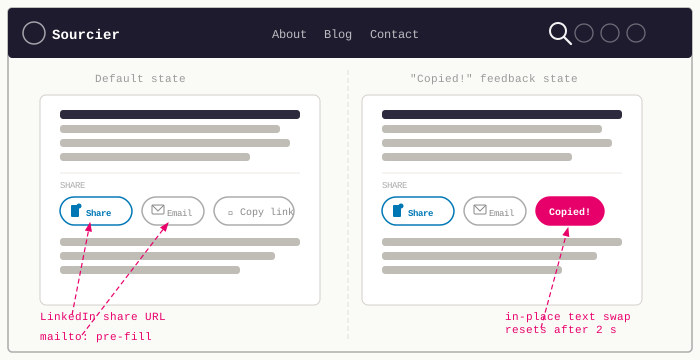
The share widget appears twice on a post page. The two placements serve different reading stages: the hero slot catches readers the moment they arrive, before they have committed to the article; the sidebar slot catches them while they are reading or after they finish, without requiring them to scroll back to the top.
In PageHero.astro, the widget sits horizontally below the post metadata, visible
immediately without scrolling. In MarkdownPostLayout.astro, a vertical variant
appears in the sidebar, staying in view as the reader moves through the content:
<SharePost url={Astro.url.href} title={frontmatter.title} vertical={true}/>The vertical prop simply toggles a CSS modifier class that changes flex-direction
from row to column and adjusts alignment. No logic changes, just layout.
Putting it together
Four share targets, no dependencies, and fewer than 120 lines including the styles.
The share URLs follow the same pattern: encode the inputs, assemble the query string,
let the platform handle the rest. The clipboard interaction is the only part that
requires JavaScript, and even that is a single async handler with a window.prompt
fallback for the rare case where the API is unavailable.
The subtlest part of the implementation is the data-bound guard. The widget
appears twice on every post page and the Astro script block runs once per page
load, so without the guard each button would accumulate duplicate listeners on
every render. It is a one-liner that is easy to miss and quietly breaks the UX
if you do.
Next up: page history and credits, covering transparent revision logs and why attribution deserves to be a first-class concern rather than an afterthought.
Working on something similar?
Need help raising the bar?
I help teams improve engineering practice through hands-on delivery, pragmatic reviews, and mentoring. If you want a second pair of eyes or practical support, let's talk.
- Engineering practice review
- Hands-on delivery
- Team mentoring
If this has been useful, you can back the writing with a one-off tip through a secure Stripe checkout.
Free · Practical · One email per post
Get practical engineering notes
One short email when a new article goes live. Useful if you are breaking into tech, growing as an engineer, or improving engineering practice on your team.
Comments
Loading comments…
Leave a comment