

Paginating a Blog in Astro
Clean URLs, placeholder cards, and no client-side JavaScript
- Published
- 25 August 2026
- Read time
- 9 min read
Was this useful?
Most blog tutorials reach for paginate() — Astro’s built-in helper — and call it done. It works, but the URLs it produces (/blog/2, /blog/3) aren’t great for SEO. Search engines prefer a clear signal that these are pages of a list, not individual resources. /blog/page/2 communicates that explicitly.
This post walks through how I built pagination on this site: clean URLs, no client-side JavaScript, placeholder cards, and a reusable BlogGrid component.
The URL structure
The target structure:
/blog → page 1 (canonical)/blog/page/2 → page 2/blog/page/3 → page 3Page 1 lives at /blog with no page number — it’s the canonical listing URL and the one that gets linked to from everywhere. Pages 2 and beyond use /blog/page/N to signal clearly that they are paginated continuations.
I deliberately avoided /blog/1 for page 1. A URL like /blog/1 implies there’s a post with the ID 1, or that the canonical URL is somehow different from /blog. Neither is true.
Why not paginate()?
Astro’s paginate() is great for getting started. You export getStaticPaths from a [...page].astro file, pass your content collection and a page size, and Astro generates all the pages. The catch is the URL pattern it produces:
/blog → page 1/blog/2 → page 2/blog/3 → page 3That flat structure is fine functionally, but /blog/page/2 is more semantically correct and is the pattern recommended by Google for paginated content. To get it with Astro you need to take back control of routing.
Two route files instead of one
Rather than fighting paginate(), I use two separate route files:
src/pages/blog/index.astro handles page 1. It’s a static page — no getStaticPaths needed — that fetches all posts, slices the first page, and renders the grid.
src/pages/blog/page/[page].astro handles pages 2 and above. It uses getStaticPaths to generate one static page per remaining page number.
export async function getStaticPaths() { const PAGE_SIZE = 9; const allPosts = (await getCollection("posts")) .filter(isPublished) .sort((a, b) => b.data.pubDate.valueOf() - a.data.pubDate.valueOf()); const totalPages = Math.ceil(allPosts.length / PAGE_SIZE); return Array.from({ length: totalPages - 1 }, (_, i) => ({ params: { page: String(i + 2) }, }));}The length: totalPages - 1 is key — page 1 is handled by index.astro, so this file only generates pages 2 through N. Attempting to generate page 1 here would create a conflicting route at /blog/page/1.
isPublished is the same helper from the scheduled publishing post — it filters out drafts and future-dated posts outside of dev mode, so archive pages never leak unpublished content.
Notice that getStaticPaths only returns params, not props. The actual page data — the slice of posts, currentPage, prevUrl, nextUrl — is recomputed in the component script below, using Astro.params.page:
const PAGE_SIZE = 9;const currentPage = Number(Astro.params.page);
const allPosts = (await getCollection("posts")) .filter(isPublished) .sort((a, b) => b.data.pubDate.valueOf() - a.data.pubDate.valueOf());
const totalPages = Math.ceil(allPosts.length / PAGE_SIZE);const posts = allPosts.slice( (currentPage - 1) * PAGE_SIZE, currentPage * PAGE_SIZE,);const prevUrl = currentPage === 2 ? "/blog" : `/blog/page/${currentPage - 1}`;const nextUrl = currentPage < totalPages ? `/blog/page/${currentPage + 1}` : null;That means the same fetch-sort-slice logic is duplicated three times across index.astro, getStaticPaths, and the component script in [page].astro. It’s a small DRY violation, but getStaticPaths runs in an isolated build-time context before the rest of the file executes, so there’s no way to share the computed allPosts array between it and the component body without a separate module-level helper. For three call sites doing one cheap array operation, the duplication was the simpler trade-off.
A shared BlogGrid component
Both route files render the same grid. Rather than duplicating the markup, I extracted it into src/components/BlogGrid.astro, which accepts these props:
interface Props { posts: CollectionEntry<"posts">[]; currentPage: number; totalPages: number; prevUrl: string | null; nextUrl: string | null; paginationBase?: string; sectionLabel?: string; sectionTitle?: string; sectionDescription?: string;}It renders the post grid, placeholder cards, and pagination controls. Both index.astro and [page].astro import it and pass their data through, along with a section label and heading so the same component reads correctly whether it’s showing “Recent articles” on page 1 or “Posts on page 2” further into the archive. paginationBase is what lets the tag system reuse this exact component for paginated tag pages — it swaps /blog/page/N for /tags/<tag>/N without any other change.
Placeholder cards for a half-full grid
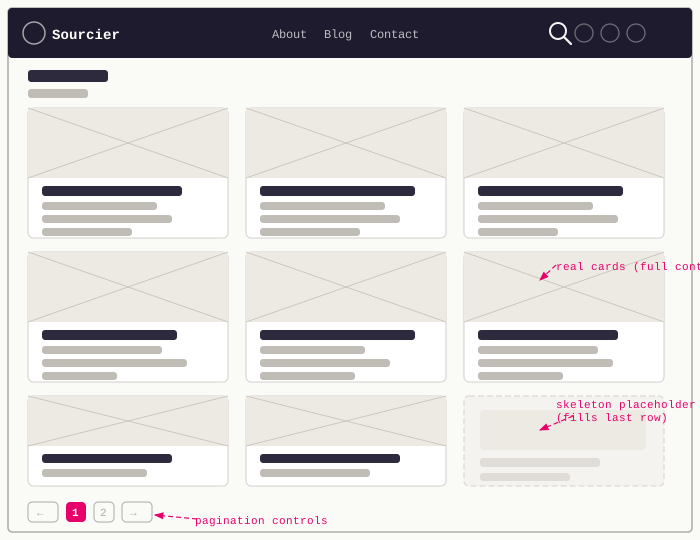
While the post count is low, a 9-post grid with only 4 real posts on the last page would look half-empty. Placeholder cards fill the remaining slots instead of leaving obvious gaps.
Click the expand icon to view it fullscreen.
The grid is responsive — two columns on tablet, three on desktop — so a placeholder count that’s correct for one breakpoint can be wrong for the other. BlogGrid.astro computes both independently, then works out how many placeholders are needed at both breakpoints, only one, or neither:
const showGhostCards = currentPage === totalPages;const TABLET_COLS = 2;const DESKTOP_COLS = 3;const tabletGhostCount = showGhostCards ? (TABLET_COLS - (posts.length % TABLET_COLS)) % TABLET_COLS : 0;const desktopGhostCount = showGhostCards ? (DESKTOP_COLS - (posts.length % DESKTOP_COLS)) % DESKTOP_COLS : 0;const sharedGhostCount = Math.min(tabletGhostCount, desktopGhostCount);const tabletOnlyGhostCount = tabletGhostCount - sharedGhostCount;const desktopOnlyGhostCount = desktopGhostCount - sharedGhostCount;Only the last page ever gets placeholders — every other page is a full row at both breakpoints. The three resulting counts each render into a differently-classed cell (--tablet-up, --tablet-only, --desktop-only) so CSS media queries can show or hide the right ones without any JavaScript recalculating the layout on resize.
I deliberately kept BlogCardPlaceholder.astro static rather than reaching for an animated loading skeleton. These cards aren’t hiding content that’s still loading — the grid is fully rendered at build time, there’s nothing to wait for. A shimmering skeleton would be actively misleading here, so the placeholder is just a dashed-border card with a quiet “More posts coming soon” label:
<div class="card card__blog card__blog--placeholder" aria-hidden="true"> <div class="card__blog--placeholder-inner"> <span class="card__blog--placeholder-label">More posts coming soon</span> </div></div>aria-hidden="true" and pointer-events: none keep it invisible to screen readers and non-interactive, since there’s nothing behind it to click or announce.
Pagination controls
The navigation sits below the grid and only renders when there’s more than one page. Previous and next links use the prevUrl/nextUrl props passed in from the route files. Page number buttons are generated from totalPages, routed through a small pageUrl() helper so the same markup works for both /blog/page/N and a tag page’s paginationBase:
function pageUrl(n: number) { if (paginationBase) { return n === 1 ? paginationBase : `${paginationBase}/${n}`; } return n === 1 ? "/blog" : `/blog/page/${n}`;}{Array.from({ length: totalPages }).map((_, i) => { const n = i + 1; return ( <a href={pageUrl(n)} aria-current={n === currentPage ? "page" : undefined}> {n} </a> );})}The n === 1 branch ensures the first page button always links to /blog (or the tag’s base URL), never /blog/page/1.
Disabled states on Previous/Next use aria-disabled and pointer-events: none rather than swapping <a> for <span>, which keeps the DOM structure consistent across all pages.
What this produces
At build time, Astro generates:
dist/blog/index.html ← page 1dist/blog/page/2/index.html ← page 2 (when posts > 9)dist/blog/page/3/index.html ← page 3 (when posts > 18)Everything is static HTML. No client-side JavaScript, no API calls, no hydration — the pagination just works as links between pre-rendered pages.
As more posts are published, the grid fills naturally. Once 10 posts exist, page 2 appears automatically at the next build.
Full code listing
---import { getCollection } from "astro:content";import { isPublished } from "../../../utils/drafts";import BaseLayout from "../../../layouts/BaseLayout.astro";import PageHero from "../../../components/PageHero.astro";import MailingListCTA from "../../../components/MailingListCTA.astro";import BlogGrid from "../../../components/BlogGrid.astro";import BlogTagCloud from "../../../components/BlogTagCloud.astro";
export async function getStaticPaths() { const PAGE_SIZE = 9; const allPosts = (await getCollection("posts")) .filter(isPublished) .sort((a, b) => b.data.pubDate.valueOf() - a.data.pubDate.valueOf()); const totalPages = Math.ceil(allPosts.length / PAGE_SIZE); return Array.from({ length: totalPages - 1 }, (_, i) => ({ params: { page: String(i + 2) }, }));}
const PAGE_SIZE = 9;const currentPage = Number(Astro.params.page);
const allPosts = (await getCollection("posts")) .filter(isPublished) .sort((a, b) => b.data.pubDate.valueOf() - a.data.pubDate.valueOf());
const totalPages = Math.ceil(allPosts.length / PAGE_SIZE);const posts = allPosts.slice( (currentPage - 1) * PAGE_SIZE, currentPage * PAGE_SIZE,);const prevUrl = currentPage === 2 ? "/blog" : `/blog/page/${currentPage - 1}`;const nextUrl = currentPage < totalPages ? `/blog/page/${currentPage + 1}` : null;---
<BaseLayout pageTitle={`Blog — Page ${currentPage} — Sourcier`}> <PageHero kicker="Writing" title="Blog" subtitle="..." />
<BlogGrid posts={posts} currentPage={currentPage} totalPages={totalPages} prevUrl={prevUrl} nextUrl={nextUrl} sectionLabel="Archive" sectionTitle={`Posts on page ${currentPage}`} sectionDescription={`Page ${currentPage} of ${totalPages} from the blog archive.`} />
<BlogTagCloud /> <MailingListCTA /></BaseLayout>---import type { CollectionEntry } from "astro:content";import BlogPost from "./BlogPost.astro";import BlogCardPlaceholder from "./BlogCardPlaceholder.astro";import readingTime from "reading-time";
interface Props { posts: CollectionEntry<"posts">[]; currentPage: number; totalPages: number; prevUrl: string | null; nextUrl: string | null; paginationBase?: string; sectionLabel?: string; sectionTitle?: string; sectionDescription?: string;}
const { posts, currentPage, totalPages, prevUrl, nextUrl, paginationBase } = Astro.props;
const showGhostCards = currentPage === totalPages;const TABLET_COLS = 2;const DESKTOP_COLS = 3;const tabletGhostCount = showGhostCards ? (TABLET_COLS - (posts.length % TABLET_COLS)) % TABLET_COLS : 0;const desktopGhostCount = showGhostCards ? (DESKTOP_COLS - (posts.length % DESKTOP_COLS)) % DESKTOP_COLS : 0;const sharedGhostCount = Math.min(tabletGhostCount, desktopGhostCount);const tabletOnlyGhostCount = tabletGhostCount - sharedGhostCount;const desktopOnlyGhostCount = desktopGhostCount - sharedGhostCount;
function pageUrl(n: number) { if (paginationBase) { return n === 1 ? paginationBase : `${paginationBase}/${n}`; } return n === 1 ? "/blog" : `/blog/page/${n}`;}---
<section class="section blog-grid-section flow-section"> <div class="container is-max-desktop"> {posts.map((post) => ( <div class="blog-grid__cell"> <BlogPost title={post.data.title} url={`/blog/${post.id}`} cover={post.data.cover} pubDate={post.data.pubDate} draft={post.data.draft} readingTime={readingTime(post.body ?? "").text} /> </div> ))} {Array.from({ length: sharedGhostCount }).map(() => ( <div class="blog-grid__cell blog-grid__ghost-cell blog-grid__ghost-cell--tablet-up"> <BlogCardPlaceholder /> </div> ))} {Array.from({ length: tabletOnlyGhostCount }).map(() => ( <div class="blog-grid__cell blog-grid__ghost-cell blog-grid__ghost-cell--tablet-only"> <BlogCardPlaceholder /> </div> ))} {Array.from({ length: desktopOnlyGhostCount }).map(() => ( <div class="blog-grid__cell blog-grid__ghost-cell blog-grid__ghost-cell--desktop-only"> <BlogCardPlaceholder /> </div> ))}
{totalPages > 1 && ( <nav class="pagination-nav" aria-label="Blog pagination"> <a href={prevUrl} aria-disabled={!prevUrl} tabindex={!prevUrl ? -1 : 0} > ← Previous </a> <div class="pagination-nav__pages" role="list"> {Array.from({ length: totalPages }).map((_, i) => { const n = i + 1; return ( <a href={pageUrl(n)} role="listitem" aria-current={n === currentPage ? "page" : undefined} > {n} </a> ); })} </div> <a href={nextUrl} aria-disabled={!nextUrl} tabindex={!nextUrl ? -1 : 0}> Next → </a> </nav> )} </div></section>Working on something similar?
Need help raising the bar?
I help teams improve engineering practice through hands-on delivery, pragmatic reviews, and mentoring. If you want a second pair of eyes or practical support, let's talk.
- Engineering practice review
- Hands-on delivery
- Team mentoring
If this has been useful, you can back the writing with a one-off tip through a secure Stripe checkout.
Free · Practical · One email per post
Get practical engineering notes
One short email when a new article goes live. Useful if you are breaking into tech, growing as an engineer, or improving engineering practice on your team.
Comments
Loading comments…
Leave a comment